Agentic Translation#
Overview#
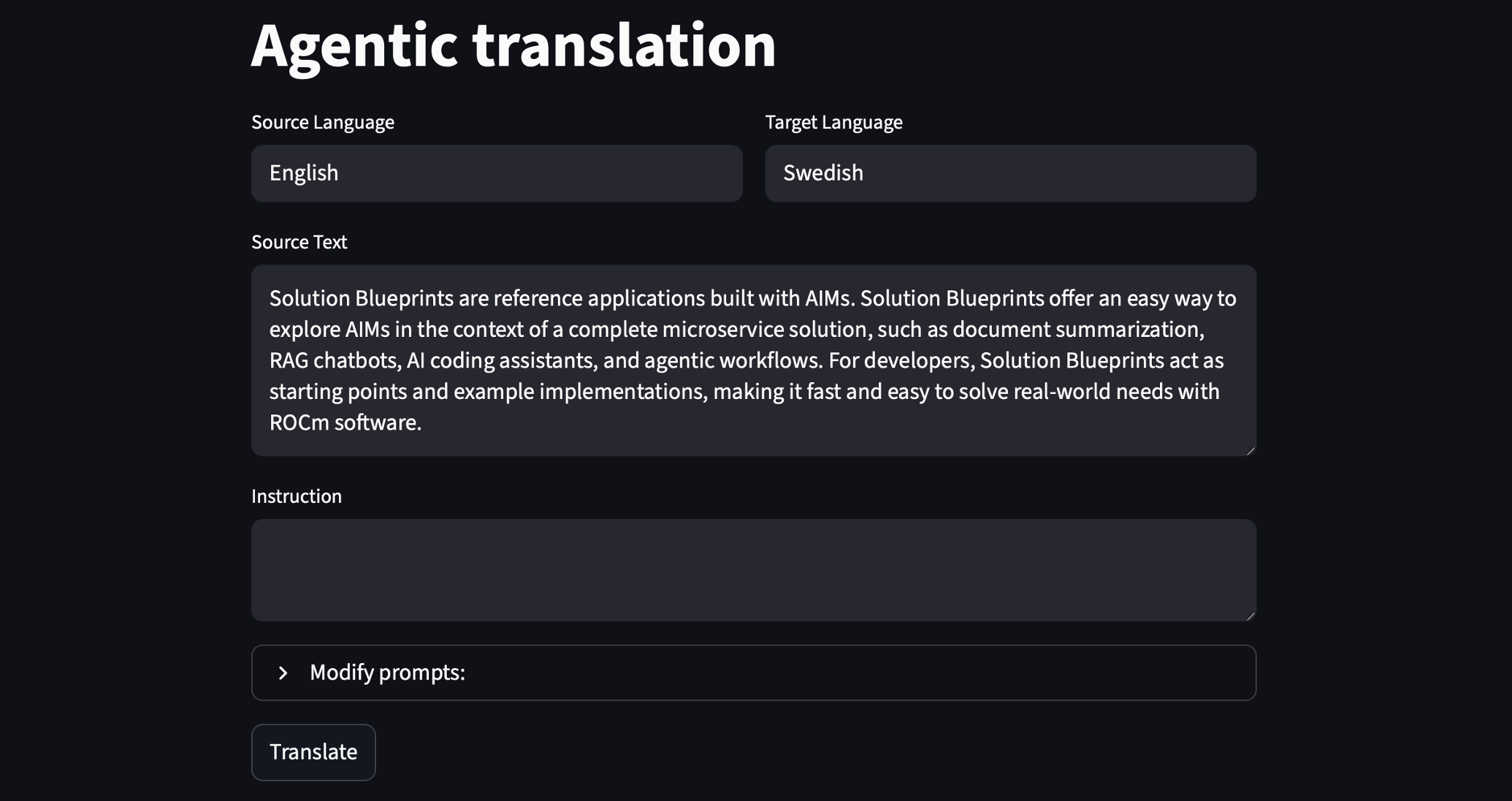
This Solution Blueprint illustrates how language translation can be implemented using AIMs. It uses agentic translation, employing multiple LLM agents working collaboratively, where models critique, evaluate, and refine each other’s outputs to improve the overall quality of the translation.
The blueprint follows a trilateral collaboration framework from Wu et al. with an Action agent, Critique agent, and Judgment agent iteratively contributing to the translation task until the Judgment agent approves the output. The prompting strategy is adapted from Andrew Ng’s example.
AMD Solution Blueprints are packaged as Helm charts for deployment on a Kubernetes cluster. For development or further exploration, the source code is public and available in the Solution Blueprints GitHub repository.
Architecture#
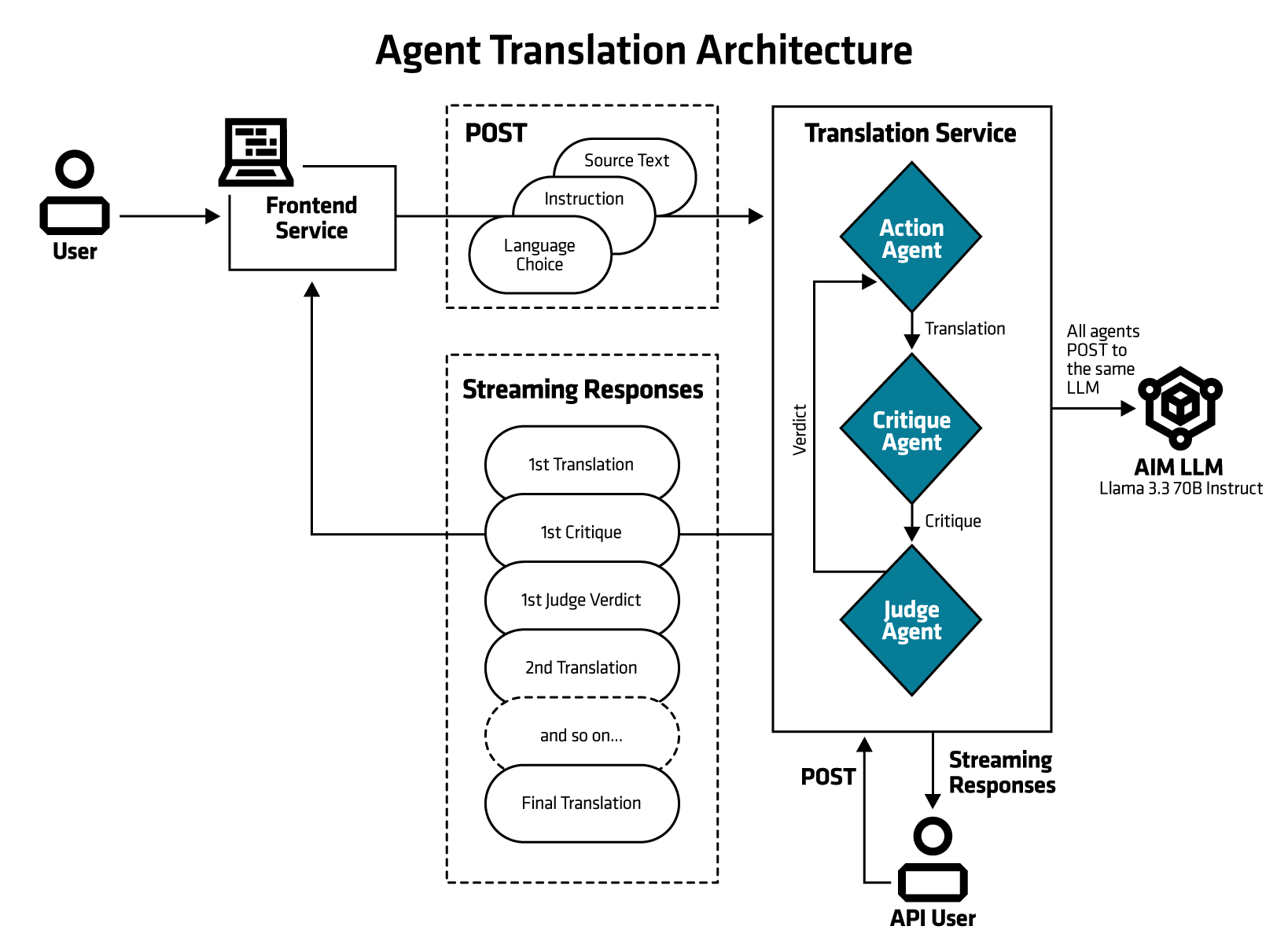
The blueprint provides a Streamlit web application for agentic translation with multi-agent LLM collaboration. By default, an AIM is deployed (Llama-3.3-70B) to power the Action, Critique, and Judgment agents.
Component |
Role |
|---|---|
Streamlit UI |
Web interface for entering text, instructions, and languages; reviewing translations and agent dialogue |
Agentic translation pipeline |
Action, Critique, and Judgment agents with iterative refinement |
AIM LLM |
Powers the multi-agent translation workflow (default: Llama-3.3-70B) |
LangChain |
Implementation of the agents |
Key Features#
Additional instructions: The agentic translation can incorporate additional user-provided instructions
Multilingual support: Users can freely use any languages supported by the underlying LLM
Visible agent dialogue: The conversation between the agents is made visible to the user
Long inputs: If the input text exceeds the model’s context window, it is automatically split into smaller chunks for processing
Getting Started#
This is a quick start guide on how to deploy the blueprint. For advanced options, such as reusing an existing AIM, providing a Hugging Face token, or overriding storage classes, see Deploying Solution Blueprints with Helm or explore the advanced deployment guide.
Prerequisites#
System Requirements#
This blueprint can be deployed on AMD Instinct (default) and AMD Radeon. The blueprint requires the following cluster resources by default, depending on the hardware being used:
Resource |
Instinct |
Radeon |
|---|---|---|
GPUs |
1 |
1 |
CPUs |
5 CPU cores |
5 CPU cores |
RAM |
68 Gi |
36 Gi |
To deploy to the Kubernetes cluster, ensure the following prerequisites are met:
Deployment#
For advanced deployment options, explore the advanced deployment guide. Solution Blueprints are packaged as OCI-compliant Helm charts in the Docker Hub registry and can be deployed to a Kubernetes cluster with a single command. Define the name (deployment name) and the namespace (Kubernetes namespace), then pipe the output of helm template to kubectl apply -f -.
Find the deployment command below.
Note: You can create a namespace using kubectl create namespace <my-namespace>.
name="my-deployment"
namespace="my-namespace"
helm template $name oci://registry-1.docker.io/amdenterpriseai/aimsb-agentic-translation \
  | kubectl apply -f - -n $namespace
name="my-deployment"
namespace="my-namespace"
helm template $name oci://registry-1.docker.io/amdenterpriseai/aimsb-agentic-translation \
  --set global.platform=radeon \
  | kubectl apply -f - -n $namespace
Verify Deployment#
To check the status of the deployment, run:
kubectl get pods -n $namespace
Wait until all pods report Running and Ready.
Connect to UI#
To connect to the UI, port-forward to 8501. The UI will then be available at http://localhost:8501 in your browser.
kubectl port-forward services/aimsb-agentic-translation-${name} 8501:8501 -n $namespace
Once connected, use the application as follows:
Enter the source text and optional extra instructions
Choose source and target languages (any pair supported by the underlying model)
Run translation and review the final output and the visible agent conversation
Clean Up#
When you are finished, remove the deployed resources using the same deployment command, with kubectl delete instead of kubectl apply. For example, for Instinct use the following command:
helm template $name oci://registry-1.docker.io/amdenterpriseai/aimsb-agentic-translation \
  | kubectl delete -f - -n $namespace
Third-Party Components#
This Solution Blueprint uses multiple third-party components. To see the full set of software and Python dependencies, explore the repository source and dependency files. The table below highlights some of the key components. For further license information, refer to each component’s official documentation.
Component |
License |
|---|---|
Streamlit |
Apache 2.0 |
LangChain |
MIT |
translation-agent (andrewyng/translation-agent) |
MIT |
Translation Agent: Agentic translation using reflection workflow
Original source: https://github.com/andrewyng/translation-agent
License: MIT https://github.com/andrewyng/translation-agent?tab=MIT-1-ov-file
Terms of Use#
AMD Solution Blueprints are released under the MIT License, which governs the parts of the software and materials created by AMD. Third-party Software and Materials used within the Solution Blueprints are governed by their respective licenses.