MedWorkUp — Clinical Diagnostic Assistant#
Overview#
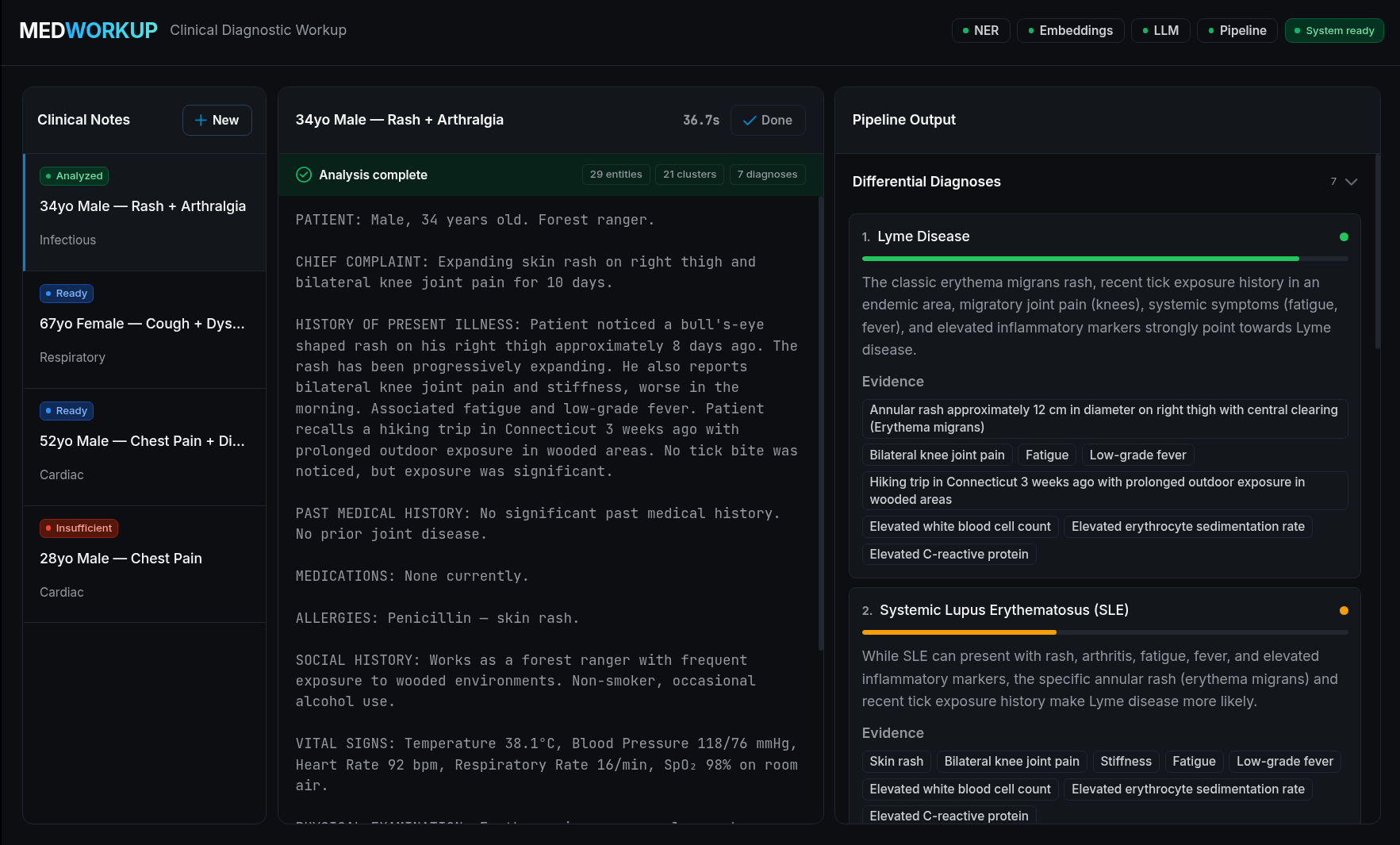
Clinical notes contain critical diagnostic information that, when processed intelligently, can generate structured differential diagnoses to support clinical decision-making.
This blueprint presents a nine-step NLP pipeline that processes raw clinical (SOAP format) notes through:
Preprocessing — SOAP section detection, negation handling, abbreviation expansion
Named Entity Recognition — Parallel GLiNER biomedical NER and MedCAT concept linking
Entity Aggregation — Span merging, deduplication, and normalization
Semantic Embeddings — SapBERT cosine-similarity clustering of clinical entities
Categorization — LLM-based classification of entities into symptoms / diseases / findings
Candidate Generation — Differential diagnosis candidate list via LLM reasoning
Evidence Reasoning — Constrained chain-of-thought reasoning grounded in extracted evidence
Ranking — Score-based sorting and confidence filtering
Consistency Check — Cross-verification and diagnosis adjustment via LLM
AMD Solution Blueprints are packaged as helm charts for deployment on a Kubernetes cluster. For development or further exploration, the source code is public and available in the Solution Blueprints GitHub repository.
Architecture#
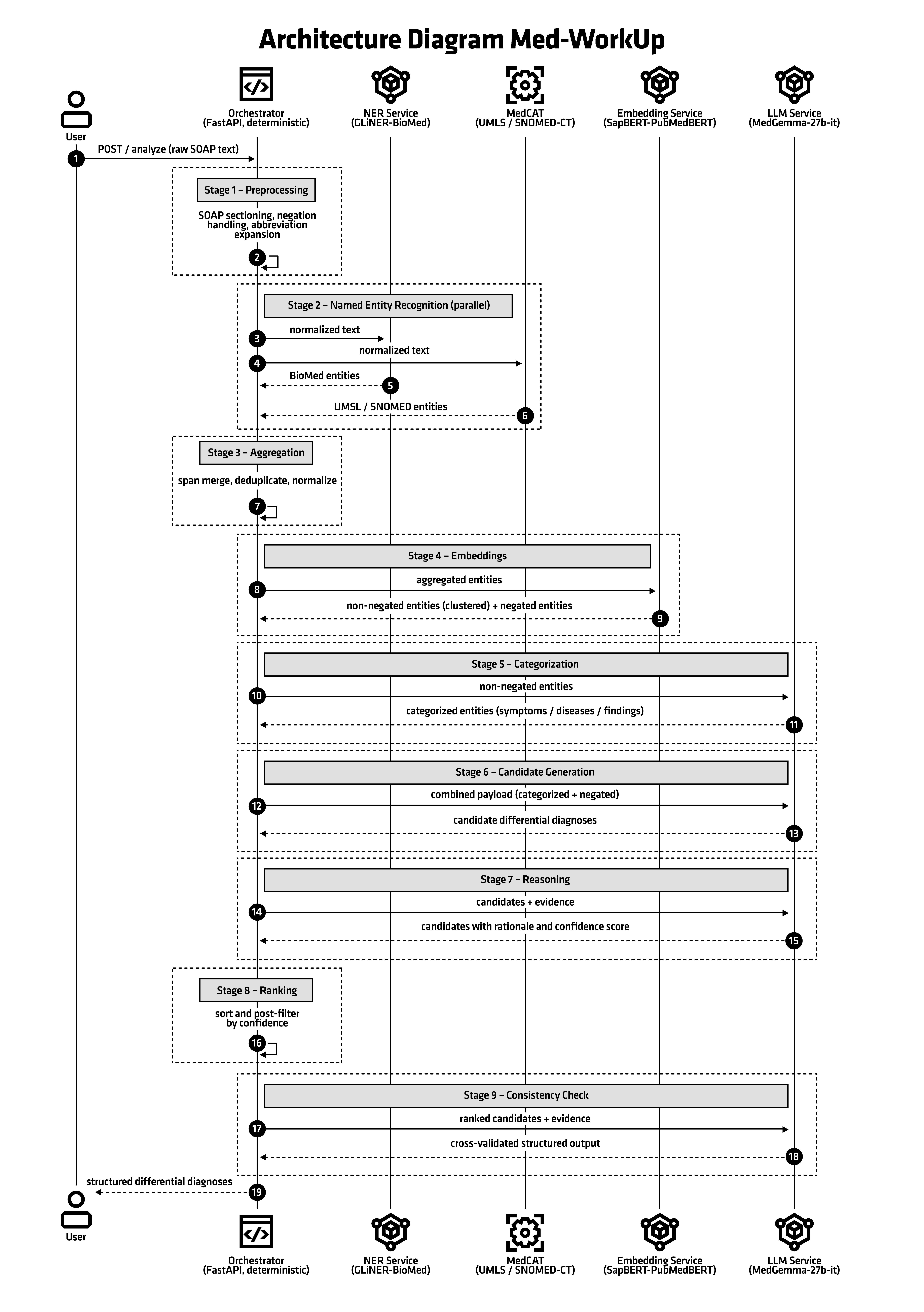
Requests flow from the browser UI to the orchestrator, which drives the nine-step pipeline across the NER, embedding, MedCAT, and MedGemma services over internal cluster DNS:
Browser → http://localhost:8080 (UI / nginx)
              │
              └─► orchestrator:8003  (FastAPI NLP pipeline)
                      ├─► ner-service:8001        (GLiNER NER)
                      ├─► embedding-service:8002  (SapBERT embeddings)
                      ├─► medcat-service:8004      (MedCAT NER+L)
                      └─► medgemma:80               (MedGemma 27B LLM, via the aimchart-llm subchart)
MedWorkUp is composed of six services:
Component |
Port |
Role |
|---|---|---|
UI |
8080 |
nginx reverse proxy + React SPA. Primary user entry point. |
Orchestrator |
8003 |
FastAPI service that drives the 9-step NLP pipeline and exposes |
NER Service |
8001 |
GLiNER biomedical named entity recognition. Supports ONNX mode (fast, offline) and HuggingFace mode (auto-download). |
Embedding Service |
8002 |
SapBERT biomedical embeddings for entity similarity clustering. Supports ONNX and HuggingFace modes. |
MedCAT Service |
8004 |
CogStack MedCAT NER+L REST API for UMLS/SNOMED concept linking. Uses pre-built |
MedGemma |
80 |
MedGemma 27B multimodal LLM served via AMD AIM, deployed as the |
Key Features#
Full control over your data and privacy — clinical notes are processed entirely within your own infrastructure, with no calls to external APIs
Structured, evidence-grounded differential diagnoses produced from free-text SOAP notes
Combines specialized biomedical models (GLiNER, SapBERT, MedCAT) with MedGemma 27B reasoning
Transparent and inspectable — every pipeline stage and its evidence can be logged, debugged, and audited
Offline-capable model loading via ONNX mode for air-gapped or regulated environments
Suitable for regulated healthcare settings where cloud clinical NLP services are restricted or disallowed
Getting Started#
This is a quick start guide on how to deploy the blueprint. For advanced options — creating the required credential secrets, reusing storage, or enabling gateway access — see the advanced deployment guide.
Prerequisites#
System Requirements#
This blueprint can be deployed on AMD Instinct. The blueprint requires the following cluster resources by default:
Resource |
Default Configuration |
|---|---|
GPUs |
1 (AMD Instinct, for MedGemma) |
CPUs |
35 CPU cores |
RAM |
243 GiB |
To deploy to the Kubernetes cluster, ensure the following prerequisites are met:
kubectl: Installed and configured to communicate with the cluster
Helm 3.16 – 4.2.0: Installed on your local machine
A HuggingFace token from an account that has accepted the MedGemma license (for the MedGemma model download — a token alone is not sufficient), and a UMLS API key (for MedCAT), provided as Kubernetes Secrets — see the advanced deployment guide
Deployment#
For advanced deployment options, explore the advanced deployment guide. Solution Blueprints are packaged as OCI-compliant Helm charts in the Docker Hub registry and can be deployed to a Kubernetes cluster with a single command. After creating the required credential secrets, define the name (deployment name) and the namespace (Kubernetes namespace), then pipe the output of helm template to kubectl apply -f -:
name="my-deployment"
namespace="my-namespace"
helm template $name oci://registry-1.docker.io/amdenterpriseai/aimsb-medworkup \
  | kubectl apply -f - -n $namespace
Note: You can create a namespace using kubectl create namespace $namespace.
Verify Deployment#
To check the status of the deployment, run:
kubectl get pods -n $namespace
Wait until all pods report Running and Ready. On first run, MedCAT and MedGemma models are downloaded automatically and may take some time to become ready.
Connect to UI#
To connect to the UI, port-forward to port 8080. The UI will then be available at http://localhost:8080 in your browser.
kubectl port-forward services/$name-aimsb-medworkup-ui 8080:8080 -n $namespace
Clean Up#
When you are finished, remove the deployed resources using the same deployment command, with kubectl delete instead of kubectl apply:
helm template $name oci://registry-1.docker.io/amdenterpriseai/aimsb-medworkup \
  | kubectl delete -f - -n $namespace
Pipeline API#
The orchestrator exposes a JSON API:
Request#
POST /analyze
Content-Type: application/json

{
  "text": "Patient presents with fever, productive cough, and shortness of breath. SpO2 94%. CXR shows consolidation."
}
Response#
{
  "diagnoses": [
    {
      "name": "Community-acquired pneumonia",
      "confidence": 0.87,
      "evidence": ["fever", "productive cough", "SpO2 94%", "CXR consolidation"],
      "reasoning": "..."
    }
  ],
  "entities_raw": [...],
  "entities_normalized": [...],
  "categorized_entities": { ... },
  "pipeline_meta": { ... }
}
Health Endpoints#
Endpoint |
Description |
|---|---|
|
Fast liveness probe (no downstream calls) |
|
Full system health — probes all downstream services concurrently |
|
Describe pipeline stages and their service dependencies |
|
Interactive Swagger UI |
Model Loading Modes#
The NER and Embedding services support two model loading modes:
HuggingFace Mode (default)#
Models are downloaded from HuggingFace Hub on first startup and cached in a
persistent volume. Requires HUGGING_FACE_HUB_TOKEN.
ONNX Mode#
Pre-downloaded model artifacts are mounted from a local directory. No network access required at runtime. Faster startup.
Configure via NER_ONNX_PATH and EMBEDDING_ONNX_PATH environment variables
(see values.yaml or .env.example).
Third-Party Components#
This Solution Blueprint utilizes multiple components. For third-party license information, refer to each component’s documentation. Key third-party components can be seen below:
Component |
License |
|---|---|
MedGemma |
|
MedCAT |
Elastic License 2.0 |
GLiNER-BioMed |
Apache 2.0 |
SapBERT |
Apache 2.0 |
FastAPI |
MIT |
React |
MIT |
nginx |
BSD-2-Clause |
Terms of Use#
AMD Solution Blueprints are released under the MIT License, which governs the parts of the software and materials created by AMD. Third-party software and materials used within the Solution Blueprint are governed by their respective licenses.