Continue.dev Coding Assistant#
Overview#
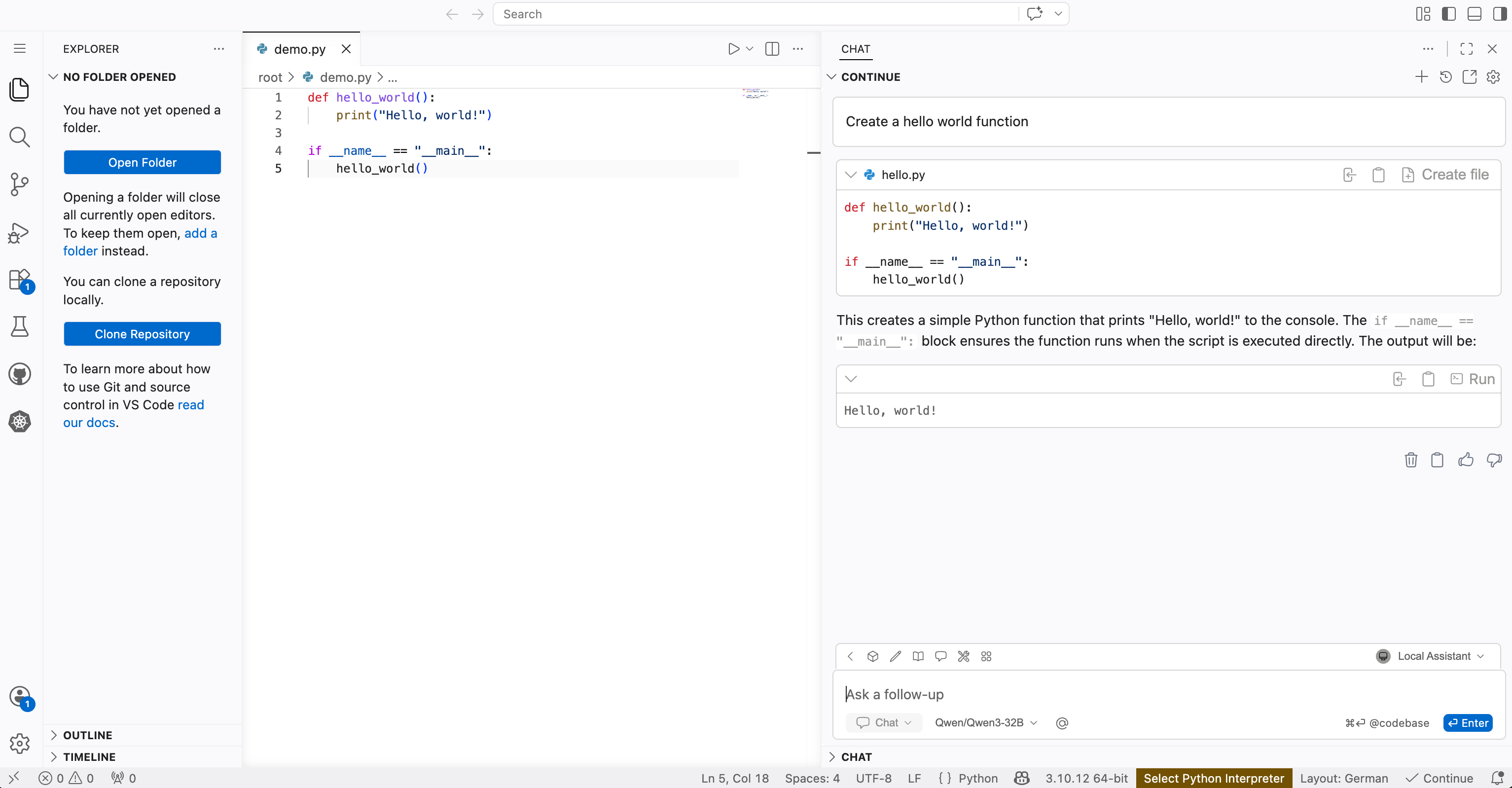
The Continue.dev Coding Assistant is an AI pair programmer that integrates into your code editor. Continue.dev uses Large Language Models (LLMs) deployed on your infrastructure to suggest, fix, and discuss code as you are developing. In this Solution Blueprint, the assistant is installed in code-server, which runs Visual Studio Code in the browser. The Coding Assistant has multiple interaction modes:
Chat: Conversational interaction with the model
Autocomplete: Inline code completions and suggestions as you type
Edit: Direct changes to selected code (for example, “refactor this function”)
Agent mode: Higher-level planning and automation where the assistant can chain actions together (for example, setting up dependencies, generating tests)
For details, see the Continue.dev documentation and the quick start guide.
AMD Solution Blueprints are packaged as helm charts for deployment on a Kubernetes cluster. For development or further exploration, the source code is public and available in the Solution Blueprints GitHub repository.
Architecture#

The blueprint integrates three components: a code-server browser IDE, the Continue.dev extension inside it, and AIM LLM services. By default, one AIM serves the main assistant (Qwen3-32B), while a second AIM handles autocompletion (Qwen2.5-Coder-7B). The IDE runs in a ROCm/PyTorch container with a dedicated GPU, so you can develop GPU-accelerated workloads in the same environment.
Component |
Role |
|---|---|
code-server |
Browser-based IDE |
Continue.dev extension |
AI pair programming assistant |
AIM (main) |
Primary coding assistant (default: Qwen3-32B) |
AIM (autocomplete) |
Dedicated autocompletion model (default: Qwen2.5-Coder-7B) |
Key Features#
Full control over your data and privacy — no calls to external APIs
Ability to choose LLM models for your specific domain or coding style
No subscription fees or usage limits
Transparent and inspectable — log, debug, and audit model and application behavior
Strong fit for experimentation with different models or agents
Suitable for regulated or proprietary codebases where cloud coding assistants are restricted or disallowed
Getting Started#
This is a quick start guide on how to deploy the blueprint. For advanced options, such as reusing an existing AIM, providing a Hugging Face token, or overriding storage classes, see Deploying Solution Blueprints with Helm or explore the advanced deployment guide.
This blueprint is designed to run on AMD Instinct GPUs.
Prerequisites#
System Requirements#
The blueprint requires the following cluster resources by default:
Resource |
Default Configuration |
|---|---|
GPUs |
3 (one for each component) |
CPUs |
8 CPU cores |
RAM |
192 Gi RAM |
To deploy to the Kubernetes cluster, ensure the following prerequisites are met:
Deployment#
Solution Blueprints are packaged as OCI-compliant Helm charts in the Docker Hub registry and can be deployed to a Kubernetes cluster with a single command. Define the name (deployment name) and the namespace (Kubernetes namespace), then pipe the output of helm template to kubectl apply -f -:
name="my-deployment"
namespace="my-namespace"
helm template $name oci://registry-1.docker.io/amdenterpriseai/aimsb-continuedev-assistant \
  | kubectl apply -f - -n $namespace
Note: You can create a namespace using kubectl create namespace $namespace.
To check the status of the deployment, run:
kubectl get pods -n $namespace
Wait until all pods report Running and Ready.
Connect to UI#
To connect to the UI, port-forward to any chosen port, e.g., 8083. The UI will then be available at http://localhost:8083 in your browser.
kubectl port-forward services/aimsb-continuedev-assistant-${name} 8083:80 -n $namespace
The Continue.dev extension is preinstalled and appears in the Extensions view on the left by default. For a clearer layout, dock Continue.dev on the right (extension install notes). For a walkthrough of the assistant, see the Continue.dev quick start.
Clean Up#
When you are finished, remove the deployed resources:
helm template $name oci://registry-1.docker.io/amdenterpriseai/aimsb-continuedev-assistant \
  | kubectl delete -f - -n $namespace
Third-Party Components#
This Solution Blueprint utilizes multiple components. For third-party license information, refer to each component’s documentation. Key third-party components can be seen below:
Component |
License |
|---|---|
code-server |
MIT |
Continue.dev |
Apache 2.0 |
Terms of Use#
AMD Solution Blueprints are released under the MIT License, which governs the parts of the software and materials created by AMD. Third-party software and materials used within the Solution Blueprint are governed by their respective licenses.