LLM Router#
Overview#
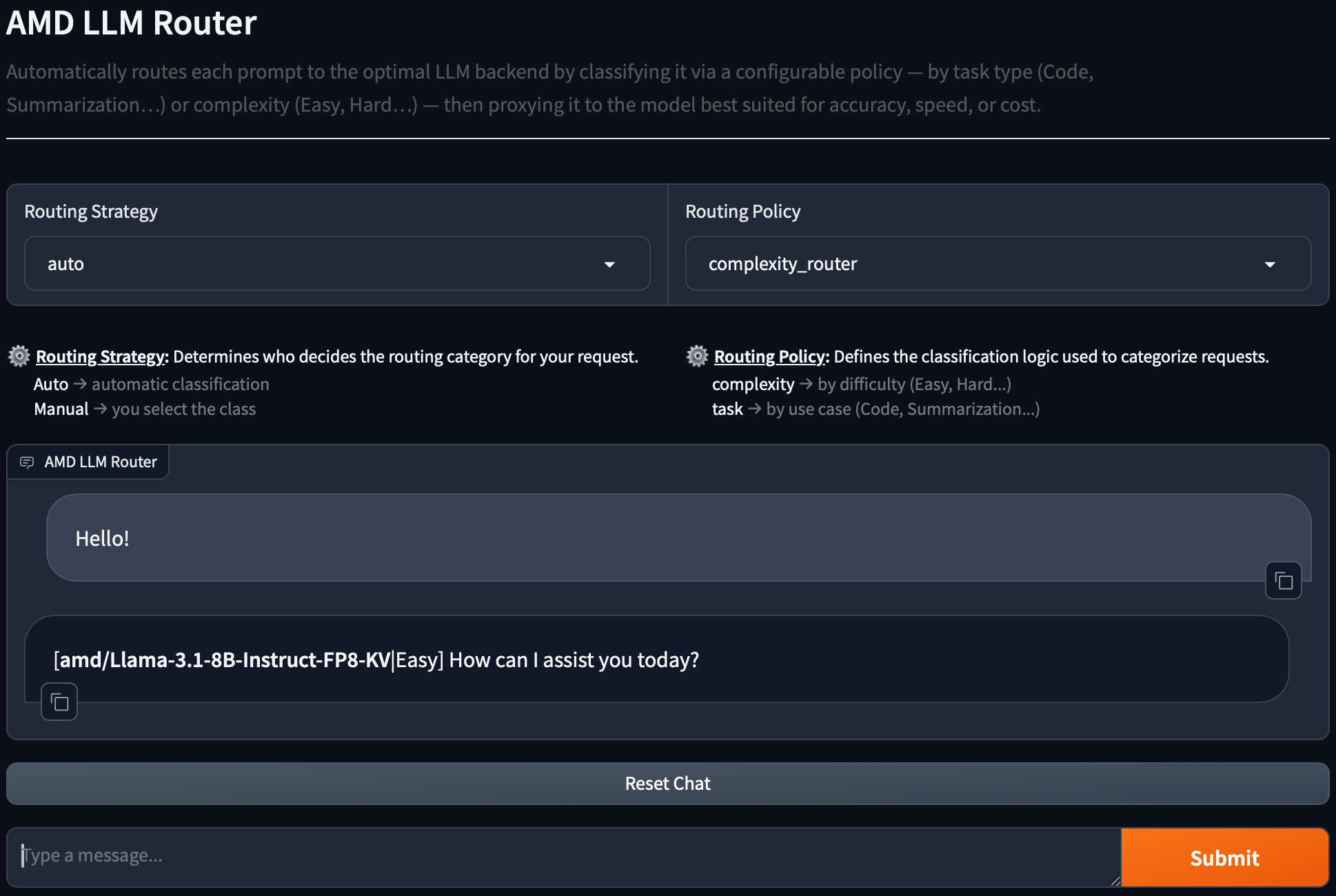
Finding the right Large Language Model (LLM) for a task can be difficult. While the perfect model would be accurate, fast, and inexpensive, real-world systems often force a choice between these competing factors.
This blueprint design presents a routing system that automates this choice. When a user submits a prompt, the system follows this process:
Applies a Routing Policy: The system uses a defined strategy, such as classifying the prompt by its task type or complexity level.
Classifies the Prompt: The system analyzes the incoming prompt and assigns it to the correct category from the policy. Two classification approaches are supported: embedding-based and LLM-based (described below).
Routes to the Optimal LLM: Based on this classification, the system automatically proxies the original prompt to the LLM backend best suited for that specific category—whether optimized for accuracy, speed, or cost.
For example, under a task classification policy, user prompts are analyzed, categorized, and seamlessly sent to the most appropriate model for execution.
User Prompt |
Task Classification |
Route To |
|---|---|---|
“Create a quicksort in go language” |
Code Generation |
secondary-llm |
“Based on these three facts: First, water boils at 100°C. Second, ice melts at 0°C. Third, evaporation occurs at various temperatures. What general conclusion can be drawn about states of matter and temperature?” |
Summarization |
primary-llm |
“Hello” |
Unknown |
primary-llm |
AMD Solution Blueprints are packaged as Helm charts for deployment on a Kubernetes cluster. For development or further exploration, the source code is public and available in the Solution Blueprints GitHub repository.
Architecture#

The LLM Router is composed of the following components:
Component |
Role |
|---|---|
Router Controller |
A proxy-like service responsible for routing OpenAI-compatible requests |
Router Classifier |
A service that analyzes and classifies the user’s prompt. Supports two classification approaches: embedding-based and LLM-based |
UI (Gradio) |
Web interface for testing routing policies and sending prompts |
Primary AIM |
Lighter-workload backend (default demo deployment: Llama 3.1 8B) |
Secondary AIM |
Heavier-workload backend (default demo deployment: Llama 3.3 70B) |
When deployed with demonstration LLMs (deployDemonstrationLLMs=true), the chart deploys two AIM backends by default: primary (Llama 3.1 8B) and secondary (Llama 3.3 70B). You can point the models at existing external LLM endpoints instead.
LLM Router Details#
This section covers classification approaches, routing policies, and LLM backend configuration. There will be references to Helm template configuration parameters (e.g. values.yaml) and other details. If you prefer to deploy the blueprint and read about the details later go to Getting Started.
Classification Approaches#
The Router Classifier supports two modes of operation, selected via embedding.enabled in
values.yaml.
Embedding-based Classification#
When values: embedding.enabled: true.
The classifier loads class descriptions from the router-controller config, computes their embeddings
using an OpenAI-compatible vLLM embedding server (aim-base) with the
intfloat/multilingual-e5-large-instruct model, and classifies each incoming prompt by finding the
class with the highest cosine similarity to the query embedding.
Pros:
Fast and lightweight — no LLM inference required for classification.
Deterministic results.
Works well even with smaller, less capable LLM backends.
Cons:
Quality depends on how well the class descriptions are written.
Requires an additional embedding service to be deployed.
LLM-based Classification#
When values: embedding.enabled: false
The classifier sends the conversation and the list of class names to a configured LLM backend, instructing it to return a structured JSON response with the chosen class.
Pros:
Can handle nuanced or ambiguous prompts better in some cases.
No additional embedding service required.
Cons:
Slower — adds an extra LLM inference call to every request.
Quality depends on the capability of the classifier LLM.
Non-deterministic — results may vary between runs.
Recommendation: Based on practical experience, the embedding-based approach performs better overall. It is faster, more consistent, and produces reliable results when class descriptions are written clearly. The LLM-based approach may occasionally handle edge cases better, but the added latency and non-determinism make it less suitable for production routing.
Policies#
The configuration file defines the available routing policies. Each class now includes both a
backend (which LLM to route to) and a description (used by the embedding classifier to match
incoming prompts).
The task_router categorizes prompts by task type:
Code Generation → secondary LLM
Summarization → primary LLM
Unknown → primary LLM
The complexity_router categorizes prompts by complexity:
Hard → secondary LLM
Middle → secondary LLM
Easy → primary LLM
Unknown → primary LLM
LLMs#
The models configuration in values.yaml defines available LLM backends. Each class in a routing
rule references a backend by name.
Example configuration from values.yaml:
models:
  - name: primary
    base_url: http://primary
    api_key: ""    # optional
    model_name: "" # optional
  - name: secondary
    base_url: http://secondary
    api_key: ""    # optional
    model_name: "" # optional

routing:
  rules:
    task_router:
      classifier_path: /classify
      classes:
        Code Generation:
          backend: secondary
          description: "Any request to create, write, generate, implement or provide code in any programming language, algorithm implementations, scripts, functions, or code examples."
        Summarization:
          backend: primary
          description: "Tasks related to summarizing text, condensing articles, conversations, documents, providing key points or brief overviews."
        Unknown:
          backend: primary
          description: "Requests that are completely unclear, off-topic, spam, or do not match ANY of the defined categories at all."

    complexity_router:
      classifier_path: /classify
      classes:
        Hard:
          backend: secondary
          description: "High-effort tasks: algorithms, complex math, deep multi-step reasoning, code writing, advanced technical topics."
        Middle:
          backend: secondary
          description: "Medium effort tasks: short explanations, standard how-to questions, everyday problem solving, moderate knowledge recall."
        Easy:
          backend: primary
          description: "Very low-effort interactions: greetings, simple yes/no questions, basic facts, casual chat."
        Unknown:
          backend: primary
          description: "Requests that are completely unclear, off-topic, spam, or do not match ANY of the defined categories at all."

classifier:
  llmBackend: secondary  # used only when embedding.enabled: false

embedding:
  enabled: true  # true = embedding approach, false = LLM approach
Getting Started#
This is a quick start guide on how to deploy the blueprint. For advanced options, such as connecting to existing LLM endpoints, configuring routing rules, or enabling HTTPRoute access, see Deploying Solution Blueprints with Helm or explore the advanced deployment guide.
This blueprint supports AMD Instinct (default) and AMD Radeon platforms. The section below covers the default Instinct deployment. For Radeon deployment and other advanced options, see:
Prerequisites#
System Requirements#
The blueprint requires the following cluster resources by default (with embedding-based classification enabled):
Resource |
Default Configuration |
|---|---|
GPUs |
1 (embedding service; router pods do not require GPUs) |
CPUs |
4 CPU cores |
RAM |
192 Gi |
For demo deployment with self-hosted LLMs (deployDemonstrationLLMs=true), plan for 3 GPUs total (2 demonstration LLMs + 1 embedding service). If you use external LLM endpoints via models configuration, GPU requirements for those services are defined by their own deployments.
To deploy to the Kubernetes cluster, ensure the following prerequisites are met:
Deployment#
Solution Blueprints are packaged as OCI-compliant Helm charts in the Docker Hub registry and can be deployed to a Kubernetes cluster with a single command. Define the name (deployment name) and the namespace (Kubernetes namespace), then pipe the output of helm template to kubectl apply -f -.
The example below sets deployDemonstrationLLMs=true to deploy with self-hosted AIM backends.
name="my-deployment"
namespace="my-namespace"
helm template $name oci://registry-1.docker.io/amdenterpriseai/aimsb-llm-router \
  --set deployDemonstrationLLMs=true \
  | kubectl apply -f - -n $namespace
Note: You can create a namespace using kubectl create namespace $namespace.
To check the status of the deployment, run:
kubectl get pods -n $namespace
Wait until all pods report Running and Ready.
Connect to UI#
To connect to the UI, port-forward to 8080. The UI will then be available at http://localhost:8080 in your browser.
kubectl port-forward services/${name}-aimsb-llm-router-ui 8080:8008 -n $namespace
Using the Router#
The LLM Router exposes an OpenAI-compatible API and can be used as a drop-in replacement for existing OpenAI-based applications. Requests keep the standard OpenAI structure, while the router transparently handles model selection based on configured routing logic.
The only required extension is the inclusion of llm-router metadata in the request body. This
metadata controls how the request is classified and routed:
policy: Defines which classification policy should be applied (by default,
task_routerorcomplexity_router).routing_strategy: Specifies how routing decisions are made.
autodelegates classification to the router-classifier service.manualskips classification and allows the client to explicitly control routing behavior.
Request format#
POST /v1/chat/completions
Content-Type: application/json
Accept: application/json
{
  "model": "string | empty",
  "messages": [
    {
      "role": "user | system | assistant",
      "content": "string"
    }
  ],
  "max_tokens": integer,
  "stream": boolean,
  "llm-router": {
    "policy": "string",
    "routing_strategy": "auto | manual",
    "model": "string | empty"
  }
}
Clean Up#
When you are finished, remove the deployed resources:
helm template $name oci://registry-1.docker.io/amdenterpriseai/aimsb-llm-router \
  --set deployDemonstrationLLMs=true \
  | kubectl delete -f - -n $namespace
Third-Party Components#
This Solution Blueprint uses multiple third-party components. To see the full set of software and Python dependencies, explore the repository source and dependency files. The table below highlights some of the key components. For further license information, refer to each component’s official documentation.
Component |
License |
|---|---|
FastAPI |
MIT |
Gradio |
Apache 2.0 |
vLLM |
Apache 2.0 |
Terms of Use#
AMD Solution Blueprints are released under the MIT License, which governs the parts of the software and materials created by AMD. Third-party Software and Materials used within the Solution Blueprints are governed by their respective licenses.