Med Assist Voice Consultation#
Overview#
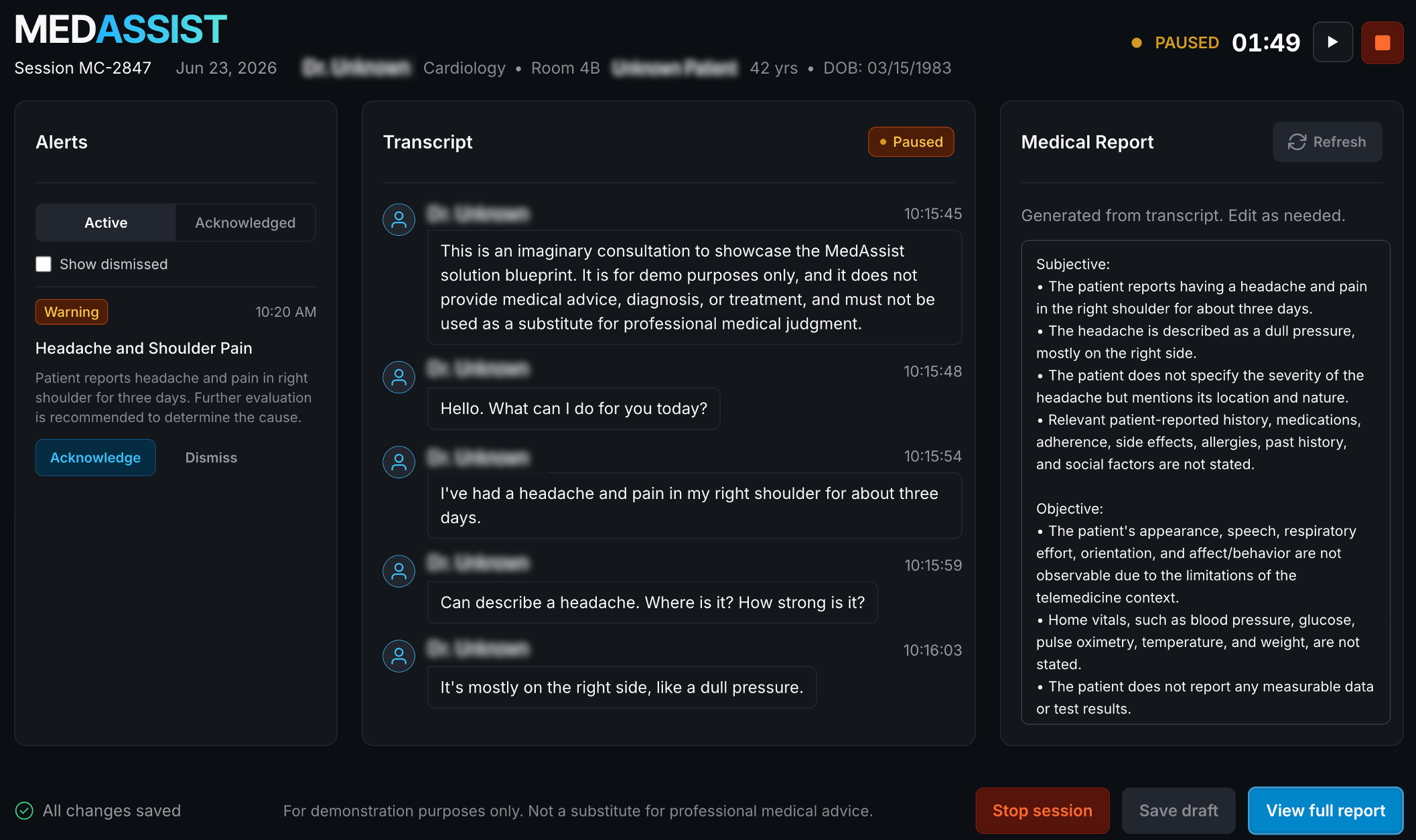
This Solution Blueprint provides an end-to-end real-time med-assist voice consultation workflow. It deploys frontend and agent services with LiveKit media transport, Qwen ASR transcription, and an LLM backend for consultation report generation.
It helps clinicians document voice consultations by transcribing doctor–patient conversations in
real time, generating structured SOAP-style (Subjective, Objective, Assessment, Plan) reports for
review, and surfacing potential clinical safety issues as categorized alerts (critical /
warning / info) during the session.
Disclaimer: This project is a demonstration application intended for technical evaluation only. It does not provide medical advice, diagnosis, or treatment, and must not be used as a substitute for professional medical judgment.
AMD Solution Blueprints are packaged as Helm charts for deployment on a Kubernetes cluster. For development or further exploration, the source code is public and available in the Solution Blueprints GitHub repository.
Architecture#

STUNner Integration#
Media traffic from the browser-based frontend to the LiveKit service now flows through STUNner, a Kubernetes-native WebRTC media gateway. STUNner acts as a STUN/TURN gateway between external clients and the LiveKit pods, simplifying NAT traversal and firewall configuration in cloud-native environments. This replaces direct exposure of LiveKit media ports in many setups.
Component |
Role |
|---|---|
STUNner (‘stunner’) |
Kubernetes-native WebRTC media gateway (STUN/TURN server) that acts as a secure entry point for media traffic between the browser-based frontend and LiveKit. |
LiveKit service ( |
WebRTC room and media transport. |
Agent service ( |
Handles transcription and LLM interactions. |
Frontend service ( |
Web UI on port 7860 for session interaction. |
AIM |
Default LLM backend dependency using Llama 3.3 70B Instruct (can be replaced via |
ASR service ( |
Default speech-to-text backend (can be replaced via |
Key Features#
Real-time voice consultation flow over LiveKit with a browser-based frontend.
Continuous transcription of the doctor–patient call via Qwen ASR during the session.
LLM-powered generation of a structured SOAP-style consultation report (Subjective, Objective, Assessment, Plan) from the call transcript.
Flexible deployment model: deploy bundled LLM/ASR dependencies or reuse existing OpenAI-compatible endpoints.
Getting Started#
Prerequisites#
Before deploying the Med Assist Voice Consultation blueprint, a cluster-admin must run
./install-prerequisites.sh once per cluster. This installs the STUNner Operator and
creates a shared cluster-wide GatewayClass named stunner. Requires cluster-admin privileges (
ClusterRole, ClusterRoleBinding, CRDs).
After the script has been run, regular users can deploy and remove the blueprint without cluster-admin privileges and without errors.
Important: The STUNner operator is shared cluster infrastructure — do not delete its pods or scale it to zero while blueprints are running. Use
./install-prerequisites.sh --uninstallto remove it after all blueprints have been removed.
Requirements:
kubectl configured and pointing at your target cluster
Helm 3.17 or higher installed
Cluster-admin or rights to create ClusterRole, ClusterRoleBinding, and CRDs
Clone the public repository amd-enterprise-ai/solution-blueprints, then run the provided script once per cluster:
git clone https://github.com/amd-enterprise-ai/solution-blueprints.git
cd solution-blueprints/solution-blueprints/med-assist
./install-prerequisites.sh
This is a quick start guide on how to deploy the blueprint. For advanced options, such as connecting
to existing LLM endpoints, configuring routing rules, enabling HTTPRoute access, STUNner
configuration details and more, see the docs at docs/DEPLOYMENT.md.
This blueprint supports AMD Instinct (default) and AMD Radeon platforms. The section below covers the default Instinct deployment. For Radeon and other advanced options, see:
System Requirements#
Kubernetes cluster with GPU-capable worker nodes for LLM/ASR inference workloads.
STUNner Operator must be installed on the cluster to provide the WebRTC media gateway functionality. You can install it manually or by running the provided
install-prerequisites.shscript (requirescluster-adminprivileges or rights to createClusterRole,ClusterRoleBinding, and CRDs).Network configuration that allows client access to frontend and LiveKit endpoints (media traffic is routed through STUNner).
LiveKit media traffic requires preliminary network/firewall configuration. With STUNner integration, direct exposure of LiveKit media ports on worker nodes is no longer required in most setups.
If you use
livekit.exposure.mode=nodePort, you must still allow inbound TCP to the chosen NodePort (default32080) for WebSocket signaling.For details on configuring STUNner, LiveKit media routing, and firewall rules, see
docs/DEPLOYMENT.md.
Resource requirements (defaults in
values.yamlforagentandfrontendservices):Total CPU requests: 1 CPU (agent: 500m, frontend: 500m)
Total CPU limits: 4 CPU (agent: 2, frontend: 2)
Total memory requests: 2Gi (agent: 1Gi, frontend: 1Gi)
Total memory limits: 4Gi (agent: 2Gi, frontend: 2Gi)
Model serving resources (default bundled dependencies):
LLM (
llm): requests/limitsamd.com/gpu: 1,cpu: 4,memory: 64Gi, plus ephemeral storage512Gi.ASR (
qwen-asr): requests/limitsamd.com/gpu: 1(forQwen/Qwen3-ASR-1.7B), with memory sizing depending on your ASR image/config.GPU planning baseline: plan for at least 2 GPUs total when running both bundled model services (
1for LLM +1for ASR).If you use
llm.existingServiceand/orqwen-asr.existingService, GPU requirements are defined by those external services.
Deployment#
See the deployment docs and follow the instructions (docs/DEPLOYMENT.md):
Deploy from the OCI registry with
helm template ... | kubectl apply -f -.Set
pythonServices.frontend.env.LIVEKIT_WS_URLto your external LiveKit WebSocket URL.Optionally set
llm.existingServiceand/orqwen-asr.existingServiceto reuse existing backends.Access the frontend via port-forwarding or HTTPRoute.
Connect to UI#
The frontend UI is exposed on port 7860 by the frontend service. To access the UI, port-forward and then open http://localhost:7860 in the browser:
kubectl port-forward "svc/aimsb-med-assist-$name-frontend" 7860:7860 -n $namespace
Configuration Highlights#
LLM: set
llm.existingServiceto reuse an external LLM; otherwise the chart deploys the default LLM via thellmdependency.ASR (OpenAI-compatible): set
qwen-asr.existingServiceto reuse an external ASR that exposes an OpenAI-compatible audio transcription API.Agent Secrets: configure LiveKit and model access under
pythonServices.agent.env:LIVEKIT_API_KEY/LIVEKIT_API_SECRET— LiveKit credentials used by the agent.LLM_API_KEY— API key for the LLM backend when required by yourllmdeployment or external endpoint.STT_API_KEY— API key for the external ASR service when usingqwen-asr.existingService.STT_MODEL— Model name for the external ASR service when usingqwen-asr.existingService.
Frontend Secrets: configure LiveKit and model access under
pythonServices.frontend.env:LIVEKIT_WS_URL— external LiveKit WebSocket URL; without this value, chart rendering fails. Seedocs/DEPLOYMENT.mdfor details and examples.LIVEKIT_API_KEY/LIVEKIT_API_SECRET— LiveKit credentials used by the frontend.
Networking:
http_route.enabled=trueenables frontend HTTPRoute generation.LiveKit HTTPRoute is created when
livekit.enabled=true.With STUNner integration, direct exposure of LiveKit UDP media ports (
50000-60000) on worker nodes is usually not required. STUNner handles media traffic routing.If you use
livekit.exposure.mode=nodePort, you must still allow inbound TCP to the chosen NodePort (default32080) for WebSocket signaling.For full details on STUNner configuration, Gateway/UDPRoute setup, and firewall rules, see
docs/DEPLOYMENT.md.
Security: default API keys/secrets in
values.yamlare placeholders and must be overridden for production.
Model compatibility guidance#
This blueprint is validated with:
LLM services exposed via
llm.existingServiceor the defaultllmdependency. The application is designed to operate correctly with models of capability level not lower than Llama 3.3 70B. Prompts and pipeline configuration have been tuned and tested for this class of models. Using smaller or less capable models may lead to issues such as incorrect or unstable structured output; in such cases, additional prompt or configuration tuning may be necessary.ASR services that expose an OpenAI-compatible audio transcription API and are wired via the bundled
qwen-asrdependency orqwen-asr.existingService. The quality and latency of transcription will depend on the specific ASR model you choose and its configuration.
Production quality depends on model capability and prompt behavior. If you switch to different models or ASR providers, validate transcription quality and generated SOAP consultation output in your target domain.
Third-party Components#
This Solution Blueprint utilizes multiple components. For third-party license information, refer to each component’s documentation. Key third-party components are listed below.
Component |
License |
|---|---|
FastAPI |
MIT |
Gradio |
Apache 2.0 |
LiveKit |
Apache 2.0 |
STUNner |
MIT |
Pydantic |
MIT |
The blueprint also relies on AMD Inference Microservices (AIMs) for the default LLM and Qwen ASR backends. These are governed by their respective model and image licenses; see the catalog of available AIMs.
Terms of Use#
AMD Solution Blueprints are released under the MIT License, which governs the parts of the software and materials created by AMD. Third-party Software and Materials used within the Solution Blueprints are governed by their respective licenses.