FinTech Onboarding#
Overview#
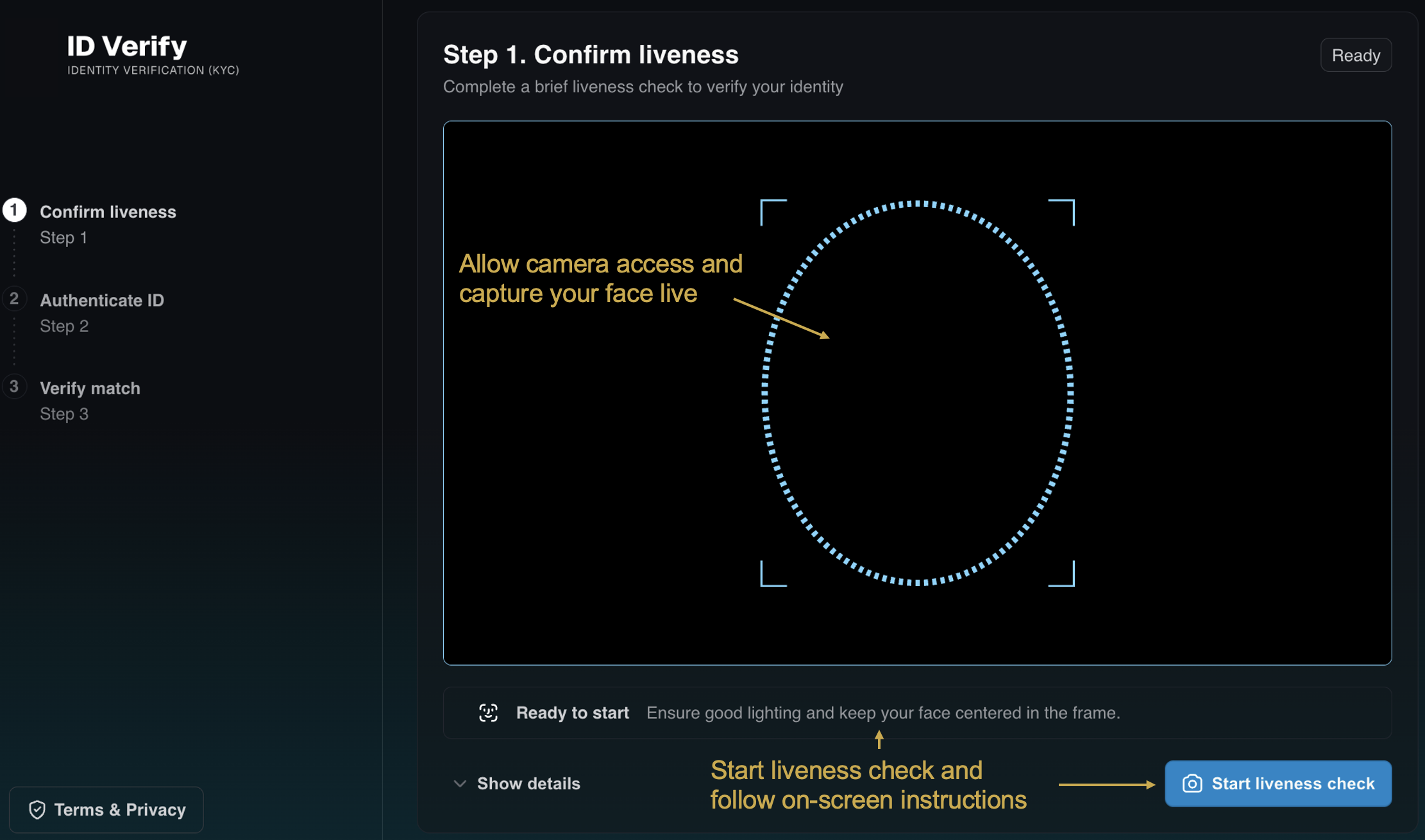
This is the landing page of the UI. Allow camera access to continue the onboarding.
A lightweight KYC (Know Your Customer) prototype for face-based identity verification. This service compares a live face captured via webcam with a face extracted from an uploaded ID document.
It uses YuNet for face detection and SFace for face recognition and embedding extraction, both from opencv_zoo.
The system is containerized using Docker and consists of the following services:
Web frontend: User interface for live face capture via webcam and uploading documents
Backend: Performs face detection and face recognition for comparison (see Model Notes section)
BFF (Backend For Frontend): Mediates access to backend infrastructure
AMD Solution Blueprints are packaged as Helm charts for deployment on a Kubernetes cluster. For development or further exploration, the source code is public and available in the Solution Blueprints GitHub repository.
Architecture#

Component |
Role |
|---|---|
BFF (Backend For Frontend) |
FastAPI proxy alongside the frontend; mediates calls to the backend |
Backend |
Face detection and similarity comparison using YuNet and SFace |
VLM |
Vision–language model (default Mistral Small 3.2 24B) |
⚠️ Restrictions: The backend uses YuNet (face detection) and SFace (face recognition) models, which are deployed inside the Backend. The models are downloaded on first startup, which may cause slower initial launch times.
Model Notes#
The service uses YuNet (face detection) and SFace (face recognition) from opencv_zoo. Both models are licensed for commercial use (MIT and Apache 2.0).
⚠️ Known restrictions:
SFace achieves competitive accuracy on standard benchmarks (LFW ~99.55%).
Robustness to occlusions (glasses, medical masks, etc.) is not formally documented for SFace; community reports indicate a drop in similarity scores under strong facial occlusions, especially around the eyes and lower face.
Key Features#
Live face capture: Browser webcam flow with a guided liveness-style check before any match step
Two-sided ID upload: Front image with face and back image with barcode, aimed at US driver’s license–style documents for the demo workflow
Visual models (CV + VLM): OpenCV Zoo YuNet and SFace handle face detection/recognition
End-to-end flow: Guided steps from live face capture through document processing to a final similarity score that compares the live face with the face on the uploaded document.
Getting Started#
This is a quick start guide on how to deploy the blueprint. For advanced options, such as reusing an existing AIM, providing a Hugging Face token, or overriding storage classes, see Deploying Solution Blueprints with Helm or explore the advanced deployment guide.
Prerequisites#
System Requirements#
This blueprint can be deployed on AMD Instinct (default) and AMD Radeon. The blueprint requires the following cluster resources by default, depending on the hardware being used:
Resource |
Instinct |
Radeon |
|---|---|---|
GPUs |
2 |
2 |
CPUs |
4 CPU cores |
4 CPU cores |
RAM |
64 Gi |
32 Gi |
To deploy to the Kubernetes cluster, ensure the following prerequisites are met:
Deployment#
For advanced deployment options, explore the advanced deployment guide. Solution Blueprints are packaged as OCI-compliant Helm charts in the Docker Hub registry and can be deployed to a Kubernetes cluster with a single command. Define the name (deployment name) and the namespace (Kubernetes namespace), then pipe the output of helm template to kubectl apply -f -.
Find the deployment command below. Note: You can create a namespace using kubectl create namespace <my-namespace>.
name="my-deployment"
namespace="my-namespace"
helm template $name oci://registry-1.docker.io/amdenterpriseai/aimsb-fintech-onboarding \
  | kubectl apply -f - -n $namespace
name="my-deployment"
namespace="my-namespace"
helm template $name oci://registry-1.docker.io/amdenterpriseai/aimsb-fintech-onboarding \
  --set global.platform=radeon \
  | kubectl apply -f - -n $namespace
Verify Deployment#
To check the status of the deployment, run:
kubectl get pods -n $namespace
Wait until all pods report Running and Ready.
Connect to UI#
To connect to the UI, port-forward to 8080. The UI will then be available at http://localhost:8080 in your browser.
kubectl port-forward services/${name}-aimsb-fintech-onboarding-ui 8080:8080 -n $namespace
How to Use the Service#
Allow camera access when prompted by the browser.
Live face capture: Click the
Start Liveness Checkbutton and follow the instructions.If you don’t have a US driver’s license, you can create a test version of one. Use this guide. Please note: The test driver licenses you create should be used only for testing this service. Do not use them for any other purpose or in production environments.
Upload front side (photo with face): Select a photo of your document that includes a face (currently supports driver’s licenses).Upload back side (barcode): Select a photo of your document that includes a barcode (currently supports driver’s licenses).Click the
Process Documentsbutton and review how the data extracted from the front and back of your document compares.Click the
Run matchbutton to see the similarity score between your live face and the face on the uploaded document.
Clean Up#
When you are finished, remove the deployed resources using the same deployment command, with kubectl delete instead of kubectl apply. For example, for Instinct use the following command:
helm template "$name" oci://registry-1.docker.io/amdenterpriseai/aimsb-fintech-onboarding | kubectl delete -f - -n "$namespace"
Third-Party Components#
This Solution Blueprint uses multiple third-party components. To see the full set of software and Python dependencies, explore the repository source and dependency files. The table below lists key components only. For further license information, refer to each component’s official documentation.
Component |
License |
|---|---|
FastAPI |
MIT |
OpenCV |
Apache 2.0 |
OpenCV Zoo (YuNet, SFace) |
See the repositories |
Terms of Use#
AMD Solution Blueprints are released under the MIT License, which governs the parts of the software and materials created by AMD. Third-party Software and Materials used within the Solution Blueprints are governed by their respective licenses.