Financial Stock Intelligence (FSI)#
Overview#
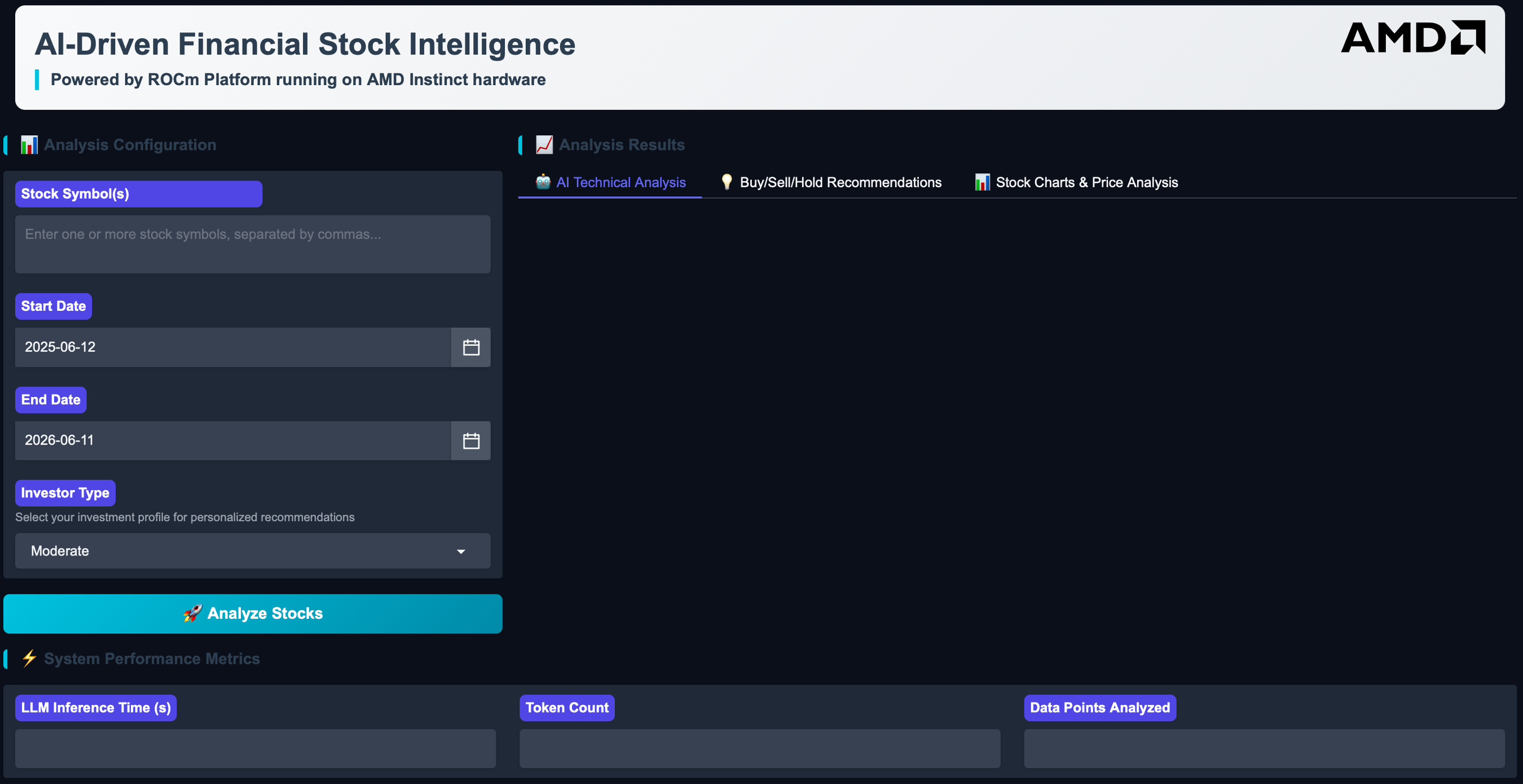
This Solution Blueprint provides a financial analysis workflow through a web interface. It combines real-time stock data, technical indicators, and Large Language Model (LLM) analysis to produce stock insights.
AMD Solution Blueprints are packaged as Helm charts for deployment on a Kubernetes cluster. For development or further exploration, the source code is public and available in the Solution Blueprints GitHub repository.
Architecture#

The blueprint provides a Gradio web application with a financial analysis pipeline and an AIM LLM service. By default, the Llama 3.3 70B AIM is deployed for analysis and commentary.
Component |
Role |
|---|---|
Gradio UI |
Web interface for entering symbols, date ranges, and reviewing results |
Analysis pipeline |
Market data retrieval, technical indicators, and visualization |
AIM LLM |
AI-generated stock insights (default: Llama 3.3 70B Instruct) |
Key Features#
Real-time stock data: Live prices and history via Yahoo Finance
Technical analysis: Simple Moving Average (SMA), Relative Strength Index (RSI), momentum, and price versus SMA comparisons
AI-powered analysis: Uses Llama 3.3 70B Instruct for intelligent stock insights
Interactive web interface: Gradio UI for easy interaction
Historical visualization: Charts and graphs for trend analysis
News integration: Incorporates relevant financial news for context
Getting Started#
This is a quick start guide on how to deploy the blueprint. For advanced options, such as reusing an existing AIM, providing a Hugging Face token, or overriding storage classes, see Deploying Solution Blueprints with Helm or explore the advanced deployment guide.
Prerequisites#
System Requirements#
This blueprint can be deployed on AMD Instinct (default), AMD EPYC, and AMD Radeon. The blueprint requires the following cluster resources by default, depending on the hardware being used:
Resource |
Instinct |
Radeon |
EPYC |
|---|---|---|---|
GPUs |
1 |
1 |
— |
CPUs |
5 CPU cores |
5 CPU cores |
189 CPU cores (default) |
RAM |
68 GiB |
36 GiB |
132 GiB |
To deploy to the Kubernetes cluster, ensure the following prerequisites are met:
Deployment#
For advanced deployment options, explore the advanced deployment guide. Solution Blueprints are packaged as OCI-compliant Helm charts in the Docker Hub registry and can be deployed to a Kubernetes cluster with a single command. Define the name (deployment name) and the namespace (Kubernetes namespace), then pipe the output of helm template to kubectl apply -f -.
Find the deployment command below.
Note: You can create a namespace using kubectl create namespace <my-namespace>.
name="my-deployment"
namespace="my-namespace"
helm template $name oci://registry-1.docker.io/amdenterpriseai/aimsb-fsi \
  | kubectl apply -f - -n $namespace
EPYC runs the model on CPU (gpus=0, bf16, AIM_ALLOW_UNOPTIMIZED=true), sized via llm.cpus/llm.memory. The default EPYC AIM is a gated image, so provide a Hugging Face token through a Secret.
name="my-deployment"
namespace="my-namespace"
kubectl create namespace $namespace
kubectl create secret generic hf-token --from-literal=hf-token=<YOUR_HF_TOKEN> -n $namespace

helm template $name oci://registry-1.docker.io/amdenterpriseai/aimsb-fsi \
  --set global.platform=epyc \
  --set llm.cpus=188 \
  --set llm.memory=128 \
  --set llm.env_vars.HF_TOKEN.name=hf-token \
  --set llm.env_vars.HF_TOKEN.key=hf-token \
  | kubectl apply -f - -n $namespace
Specify the CPU and memory resources here depending on your chosen LLM, hardware configuration, and performance needs.
Performance note: On multi-socket EPYC nodes, configure the kubelet for NUMA alignment (CPU Manager
static, Topology Managersingle-numa-node, Memory ManagerStatic); otherwise the LLM’s CPUs and memory can land on different NUMA nodes and vLLM runs effectively single-threaded.
name="my-deployment"
namespace="my-namespace"
helm template $name oci://registry-1.docker.io/amdenterpriseai/aimsb-fsi \
  --set global.platform=radeon \
  | kubectl apply -f - -n $namespace
Verify Deployment#
To check the status of the deployment, run:
kubectl get pods -n $namespace
Wait until all pods report Running and Ready.
Connect to UI#
To connect to the UI, port-forward to 8081. The UI will then be available at http://localhost:8081 in your browser.
kubectl port-forward services/aimsb-fsi-${name} 8081:80 -n $namespace
Once connected, use the application as follows:
Enter a stock symbol/ticker
Set the date range for the analysis period
Click “Analyze Stock” to fetch data, compute indicators, and generate AI commentary
Review the results: Technical indicators, charts, AI-generated analysis, and more
Clean Up#
When you are finished, remove the deployed resources using the same deployment command, with kubectl delete instead of kubectl apply. For example, for Instinct use the following command:
helm template $name oci://registry-1.docker.io/amdenterpriseai/aimsb-fsi \
  | kubectl delete -f - -n $namespace
Disclaimer#
This tool is for educational and research purposes only. It does not constitute financial advice.
Third-Party Components#
This Solution Blueprint uses multiple third-party components. To see the full set of software and Python dependencies, explore the repository source and dependency files. The table below highlights some of the main components. For further license information, refer to each component’s official documentation.
Component |
License |
|---|---|
Gradio |
Apache 2.0 |
LangChain |
MIT |
yfinance |
Apache 2.0 |
Terms of Use#
AMD Solution Blueprints are released under the MIT License, which governs the parts of the software and materials created by AMD. Third-party Software and Materials used within the Solution Blueprints are governed by their respective licenses.