MRI Analysis Tool#
Overview#
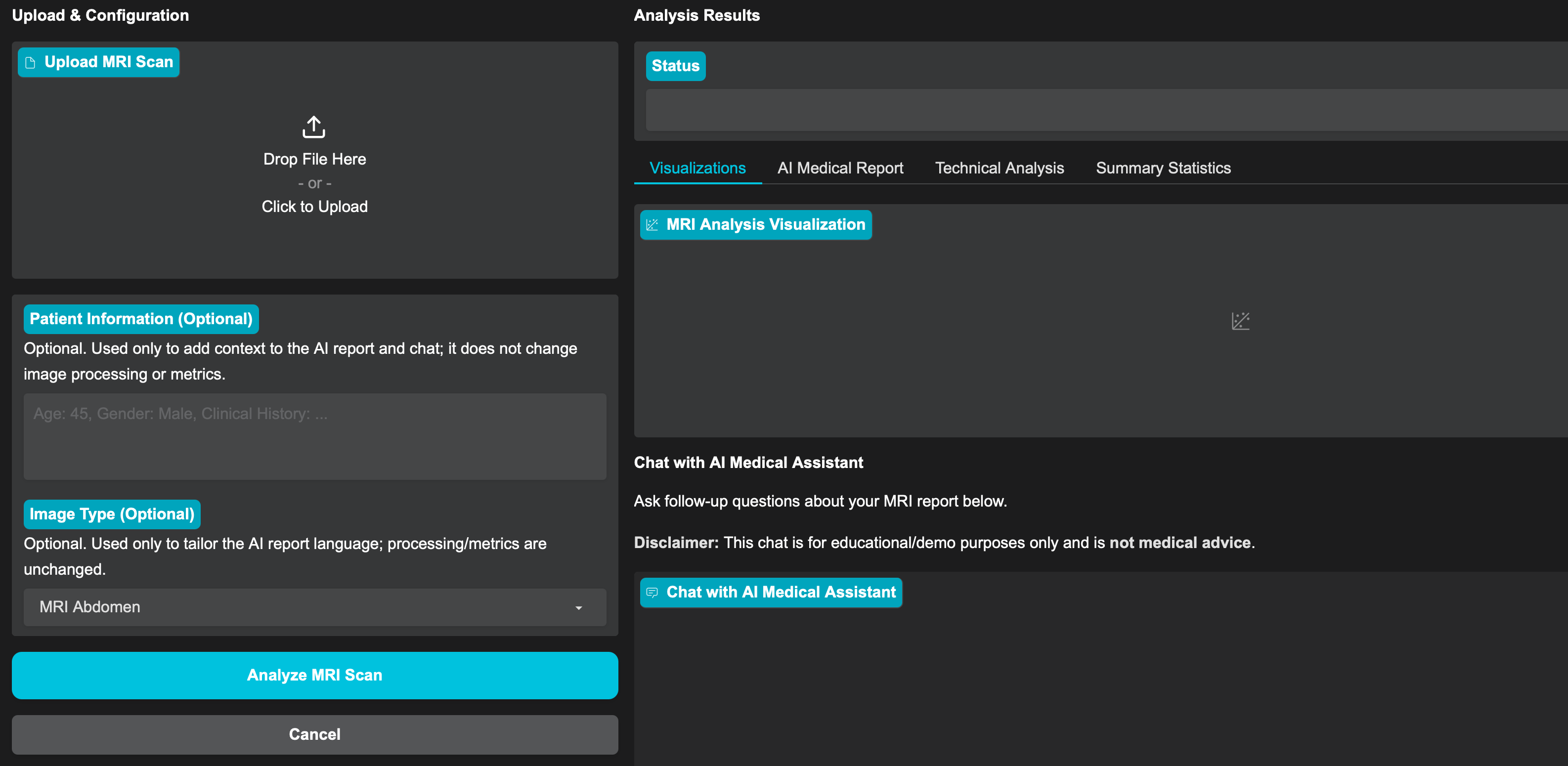
This Solution Blueprint provides an AI-assisted MRI analysis workflow through a web interface:
Users upload a scan, optionally add patient context, and select the MRI type.
The MRI is then analyzed using Computer Vision and Machine Learning tools, and a Large Language Model generates a medical report.
Users can review visualizations and metrics alongside the report, and ask follow-up questions in an interactive chat.
AMD Solution Blueprints are packaged as Helm charts for deployment on a Kubernetes cluster. For development or further exploration, the source code is public and available in the Solution Blueprints GitHub repository.
Architecture#
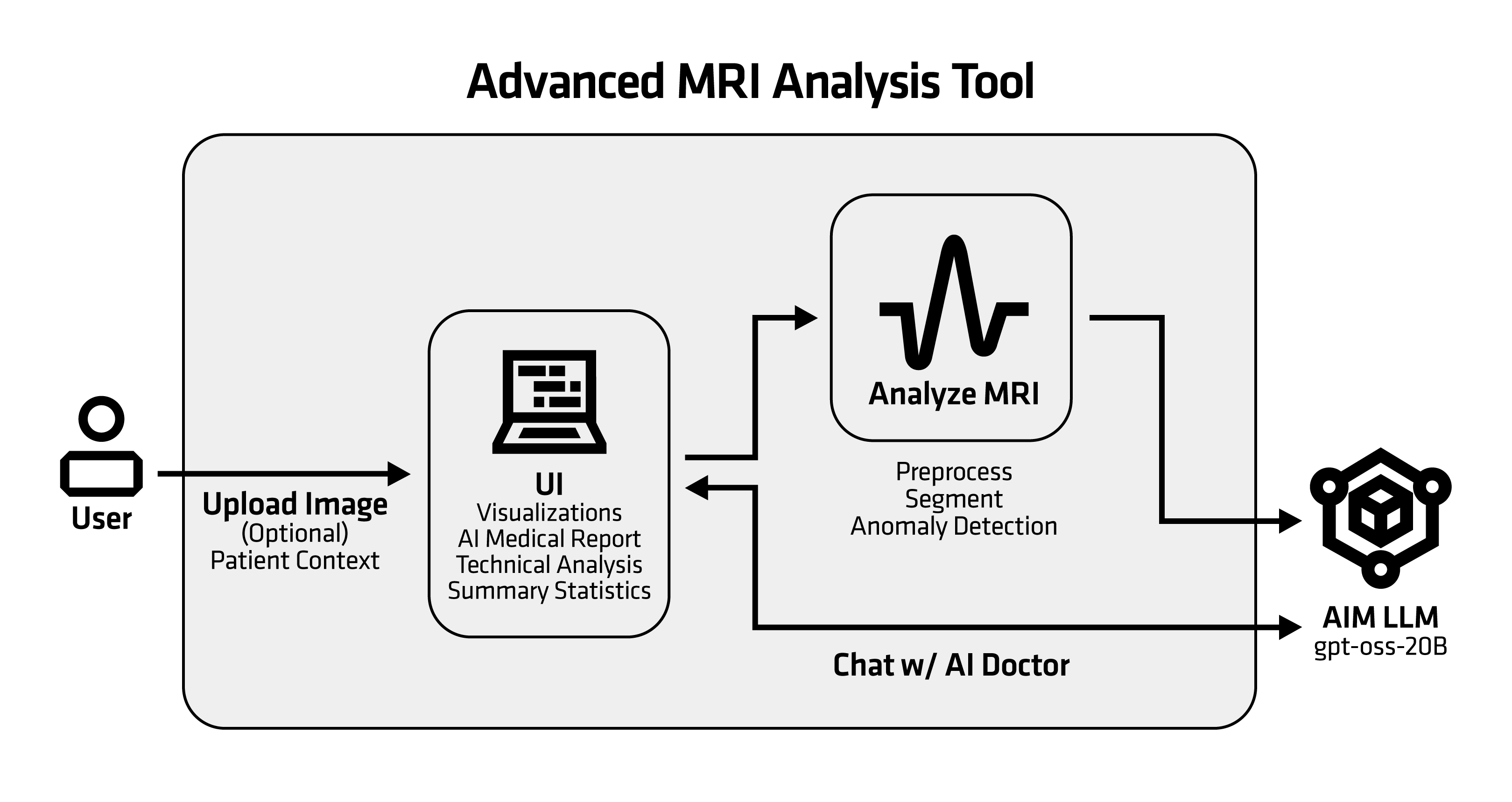
The blueprint provides a Gradio web application for AI-powered MRI analysis with deep learning and LLM insights. By default, an AIM is deployed (GPT-OSS 20B) for draft medical report generation and follow-up Q&A.
Component |
Role |
|---|---|
Gradio UI |
Web interface for uploading scans, running analysis, and reviewing results |
MRI analysis pipeline |
Image loading, preprocessing, segmentation, anomaly detection |
AIM LLM |
Draft medical report generation and follow-up Q&A (default: GPT-OSS 20B) |
Key Features#
Multi-format support: DICOM (
.dcm), NIfTI (.nii,.nii.gz), and standard image formats (.png,.jpg,.jpeg)Robust loading and normalization: DICOM decoding (pydicom), NIfTI decoding (nibabel), image fallback (OpenCV); intensity normalization to 8-bit for consistent downstream processing
Image preprocessing: Contrast enhancement using CLAHE and noise reduction using Gaussian filtering
Tissue segmentation: K-means clustering (scikit-learn) with per-cluster pixel distribution statistics
Anomaly detection: Statistical thresholding (mean + 2.5×std) with connected-component region counting (SciPy) and visualization overlays
Quantitative measurements: Image dimensions, intensity statistics, signal-to-noise ratio, and optional physical size estimates when pixel spacing metadata is available
LLM-assisted reporting: Draft medical report (Markdown) and follow-up Q&A chat
Flexible LLM configuration: Deploy the bundled AIM or connect to an existing service
Getting Started#
This is a quick start guide on how to deploy the blueprint. For advanced options, such as reusing an existing AIM, providing a Hugging Face token, or overriding storage classes, see Deploying Solution Blueprints with Helm or explore the advanced deployment guide.
Prerequisites#
System Requirements#
This blueprint can be deployed on AMD Instinct (default) and AMD Radeon. The blueprint requires the following cluster resources by default, depending on the hardware being used:
Resource |
Instinct |
Radeon |
|---|---|---|
GPUs |
1 |
1 |
CPUs |
5 CPU cores |
5 CPU cores |
RAM |
68 Gi |
36 Gi |
To deploy to the Kubernetes cluster, ensure the following prerequisites are met:
Deployment#
For advanced deployment options, explore the advanced deployment guide. Solution Blueprints are packaged as OCI-compliant Helm charts in the Docker Hub registry and can be deployed to a Kubernetes cluster with a single command. Define the name (deployment name) and the namespace (Kubernetes namespace), then pipe the output of helm template to kubectl apply -f -.
Find the deployment command below. Note: You can create a namespace using kubectl create namespace <my-namespace>.
name="my-deployment"
namespace="my-namespace"
helm template $name oci://registry-1.docker.io/amdenterpriseai/aimsb-mri-doc \
  | kubectl apply -f - -n $namespace
name="my-deployment"
namespace="my-namespace"
helm template $name oci://registry-1.docker.io/amdenterpriseai/aimsb-mri-doc \
  --set global.platform=radeon \
  | kubectl apply -f - -n $namespace
Verify Deployment#
To check the status of the deployment, run:
kubectl get pods -n $namespace
Wait until all pods report Running and Ready.
Connect to UI#
To connect to the UI, port-forward to 7861. The UI will then be available at http://localhost:7861 in your browser.
kubectl port-forward services/aimsb-mri-doc-${name} 7861:80 -n $namespace
Once connected, use the application as follows:
Upload an MRI scan file (DICOM
.dcm, NIfTI.nii/.nii.gz, or standard images.png/.jpg/.jpeg).Provide optional patient context.
Select the MRI type and run the analysis.
Review the visualization, metrics, and report output.
Example MRI scans#
If you need sample MRI scans to test with, these public resources are a good starting point (always review each dataset’s license/terms and any access requirements):
The DICOM Library has a few samples, e.g., this abdomen scan
The Cancer Imaging Archive (TCIA): Multiple MRI collections
OpenNeuro: Public neuroimaging datasets, often NIfTI
fastMRI (NYU/Facebook): MRI dataset and tools; access may require agreement
Clean Up#
When you are finished, remove the deployed resources using the same deployment command, with kubectl delete instead of kubectl apply. For example, for Instinct use the following command:
helm template $name oci://registry-1.docker.io/amdenterpriseai/aimsb-mri-doc \
  | kubectl delete -f - -n $namespace
Disclaimer#
This tool is for research and educational use only. It is not intended for clinical diagnosis or treatment.
Third-Party Components#
This Solution Blueprint uses multiple third-party components. To see the full set of software and Python dependencies, explore the repository source and dependency files. The table below highlights some of the key components. For further license information, refer to each component’s official documentation.
Component |
License |
|---|---|
Gradio |
Apache 2.0 |
LangChain |
MIT |
OpenCV |
Apache 2.0 |
Terms of Use#
AMD Solution Blueprints are released under the MIT License, which governs the parts of the software and materials created by AMD. Third-party Software and Materials used within the Solution Blueprints are governed by their respective licenses.